
Online Bass Tuner
—
--
-- cents
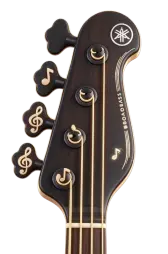
Click any of the string buttons above to hear its reference pitch.
Keyboard shortcuts: Press Q, W, E or R to quickly play the strings.
Standard bass tuning: E–A–D–G.
Other online tuners
Try our browser tuning tools built for different instruments.
Easy Bass Tuner for Every MusicianPrecision tuning made simple
Whether you are a beginner or an experienced player, this bass tuner gives you steady real-time feedback. Use it directly in your browser with no app install or download.
Advanced Real-Time Pitch Detection
This bass tuner analyzes your bass guitar frequency in real time and provides visual and numerical feedback to help you tune quickly before practice or performance.
Multiple Tuning Modes
From standard E-A-D-G tuning to drop D and other common setups, this bass tuner includes multiple modes for different musical needs.
Visual Tuning Meter
The visual tuning meter gives instant feedback. Green means you are close to target pitch, while color indicators guide you to tighten or loosen strings. The gauge shows deviation in cents for fine adjustment.
Works Offline & Cross-Platform
After the first load, core tuning features can be used without an internet connection. It works on modern browsers across desktop, tablet, and mobile.
Useful Across Different Playing Situations
From bedroom practice sessions to professional recording studios, our bass tuner serves musicians at every level.
For Personal Practice
- Practice at home with confidence knowing the bass tuner provides accurate readings
- Learn proper tuning techniques using visual feedback
- Quick tuning before jamming sessions—always accessible
For Professional Use
- Studio recording sessions where precision matters—use this bass tuner for detailed pitch checks
- Live performances where speed and accuracy are critical—responds instantly
- Music education and teaching—demonstrate proper tuning techniques
How to Use Our Bass Tuner
Using our bass tuner is straightforward. Follow these steps to tune your bass.
Choose Your Tuning Mode
Select the appropriate tuning mode. Most bass guitars use standard E-A-D-G tuning, but this bass tuner supports various configurations.
Enable Microphone Access
Click 'Start Tuning' and allow microphone access. The bass tuner needs microphone permissions to detect your bass guitar's pitch in real time.
Pluck and Adjust
Pluck each string and observe the visual feedback. This bass tuner displays frequency (Hz) and deviation (cents). Green means you're in tune, while blue or red indicates adjustment needed.
Verify Tuning
Make small, gradual adjustments based on the feedback. The bass tuner updates in real time. When strings show green, you are close to target pitch.
Key Benefits of Our Bass Tuner
Consistent Accuracy
This bass tuner provides up to ±1 cent-level precision for everyday practice and pre-recording checks.
Fast Response
Experience instant feedback with real-time updates. Unlike traditional tuners that lag, this bass tuner gives you immediate visual and numerical feedback.
Zero Installation Required
Access this bass tuner instantly from any device with a web browser. No downloads, no installations, no updates to manage. Simply bookmark and use whenever needed.
Free to Use
This tool is free to use, and core tuning features are available without a subscription.
Frequently Asked Questions About Our Bass Tuner
Q1.How accurate is this bass tuner compared to hardware tuners?
This bass tuner can provide up to ±1 cent accuracy and works well as a practical reference in most everyday practice and recording scenarios.
Q2.Do I need to download anything to use the bass tuner?
No downloads required! This bass tuner works entirely in your web browser. Simply visit the page, allow microphone access, and start tuning.
Q3.Can I use this bass tuner on my phone or tablet?
Yes. This bass tuner uses a responsive layout and runs smoothly on smartphones, tablets, and desktop computers.
Q4.What tuning modes does the bass tuner support?
This bass tuner supports standard E-A-D-G tuning as well as various alternative tunings including drop D and other popular configurations.
Q5.Why does the bass tuner need microphone access?
The tool uses your device's microphone to detect the frequency of your bass guitar strings in real time. This allows the bass tuner to provide accurate visual feedback. Microphone access is only used for tuning—we don't record or store any audio.
Q6.Can I use the bass tuner without an internet connection?
Yes. After the first page load, core tuning features can be used offline, which is useful for practice and live situations with limited connectivity.
Build Reliable Daily Bass Tuning Habits
Proper tuning is a core part of bass playing. Our bass tuner gives clear feedback so you can make steady, repeatable adjustments.
With real-time feedback, an easy interface, and no-install workflow, this bass tuner fits daily tuning for players at different skill levels.